If Your Website Was Compromised, Could You Stop Further Damage? Rethinking Cybersecurity in the Age of AI

Why understanding your technology stack and anticipating different types of attacks are becoming essential to cybersecurity.
What If a Thief Broke Into Your Home and Could Not Steal Your Items?
Imagine for a moment, a thief successfully breaks into your home.
They have bypassed your front door's lock. However once inside, they realize that your most valuable possessions are secured in a metal safe that they cannot easily break.
The thief gained access to your home, but stealing your valuable items was another challenge.
This is the analogy I use to explain an approach to cybersecurity that I believe deserves special attention.
For years, cybersecurity has placed a lot of emphasis on preventing unauthorized access, identifying vulnerabilities, and applying security patches.
These are important measures to take. However, I believe we must take it a step further by designing systems so that even when an attacker successfully exploits a vulnerability, their ability to cause further damage is significantly restricted.
We have always heard of defense in depth, least privilege, and system isolation, so this approach is not a new security principle. What I believe needs to change is how we apply these principles when designing and selecting our technology stack or environments.
This was the mindset that led me to develop Masada Hardening Pro, a WordPress security solution that leverages Linux filesystem immutability to protect critical application files. You may read my whitepaper to learn more about it here https://masadahardening.com/white-paper/
I developed the solution before the security incidents described in this article because I had already recognized the need to restrict what attackers could accomplish after gaining access.
Investigating two compromised WordPress websites further reinforced my belief in this approach and its importance today.
Artificial Intelligence Is Accelerating the Cybersecurity Challenge
Artificial intelligence(AI) is transforming how security vulnerabilities are discovered and analyzed.
Security researchers can use AI to examine code, identify weaknesses, and speed up testing. Similarly, bad actors can do the same to automate reconnaissance, identify potential vulnerabilities, and scale their exploitation attempts.
This creates a growing challenge for organizations.
What happens when attackers discover vulnerabilities before defenders learn about them or developers can fix them?
What happens when a patch is unavailable, delayed, or cannot immediately be deployed because of complex deployment requirements?
Not every unpatched vulnerability is a zero-day. However, both newly discovered vulnerabilities and known weaknesses without available or deployed fixes create an opportunity that can be exploited.
So basically, we cannot assume that every vulnerability will be patched before an attacker attempts to exploit it.
We must be prepared for situations where an attacker has successfully bypassed our defenses or taken advantage of a vulnerability.
This does not mean we no longer do vulnerability management. It means we strengthen our security architecture so if there is a successful exploit, it does not have to mean automatic unrestricted access or control.
Two Compromised WordPress Websites on the Same Server, Two Different Outcomes
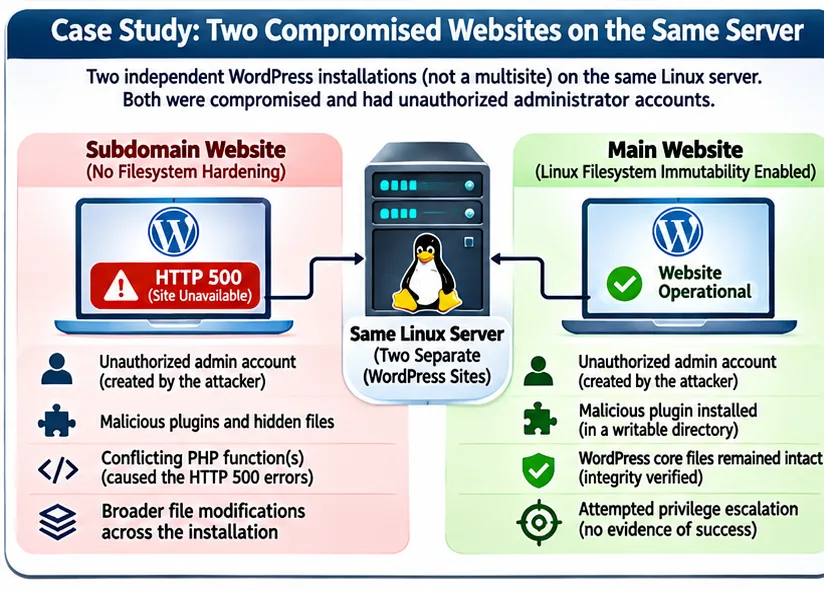
Recently, I investigated two compromised WordPress websites hosted on the same Linux server.
These were two independent WordPress installations, a main website and a subdomain website, not using WordPress's multisite feature.
Both websites had been compromised. In both cases, unauthorized administrator accounts had been created, which meant that the attackers had successfully crossed the application-level security boundary.
The WP2Shell Vulnerability Chain
An important part of this investigation was understanding how the attackers might have gained administrator access in the first place.
One possible explanation was a recently disclosed WordPress Core exploitation chain known as WP2Shell, which combined two vulnerabilities, CVE-2026-63030 and CVE-2026-60137. This exploit is possible against the WordPress version 7.0.1 which both websites had. Version 7.0.2 had the patch against WP2Shell.
The vulnerabilities involved REST API request handling and SQL injection. When combined, they could allow an unauthenticated attacker to execute code on an affected WordPress website.
This is a big deal because the attacker would not necessarily need an existing administrator's password. Exploiting this vulnerability within WordPress could provide a way to gain administrative access.
The unauthorized accounts and malicious components discovered during my investigation were consistent with this type of attack. However, I could not prove that WP2Shell was the initial entry point in either website.
What the investigation did establish was that both websites had been compromised at the application level.
This made the differences in their filesystem protections stand out to me.
Even when a vulnerability allows an attacker to gain administrator access within an application, that access should not automatically grant unrestricted modification rights over critical files or the operating system.
However, there was one particularly important difference in how the websites were protected.
The main website had the Linux filesystem immutability applied to the critical WordPress files and folders. The subdomain website did not.
The subdomain website became inaccessible, returning HTTP 500 errors.
I could have just re-installed WordPress or disabled the plugins, but then I would have lost a learning opportunity, so I examined the server logs to understand what was causing the errors.
The logs showed that a PHP function was being declared twice. Tracing the conflicting declarations allowed me to find the suspicious files at different locations within the WordPress installation.
What initially appeared to be a configuration error, as I suspected maybe this was a change in the PHP configuration, was actually a sign of the compromise.
Further investigation revealed the unauthorized administrator accounts, malicious plugins, hidden files, and components designed to execute commands on the server.
The main website, however, had a different outcome.
I did find an unauthorized administrator account, with only the malicious plugin added to WordPress uploads folder which did not have the Linux filesystem immutability restriction applied. I believe this explained why the main website remained operational as it did not have the other malicious code.
The critical WordPress core files passed my integrity check.
Why the Difference Matters
Both websites operated on the same server. Both experienced unauthorized WordPress access. However the extent of the malicious files were noticiably different.
The main website had an additional operating-system-level protection that the subdomain did not have.
Linux filesystem immutability restricts modification of protected files even when an attacker gains administrator access within WordPress.
This provides a credible technical explanation for why the protected website's critical files passed the integrity check, while the unprotected subdomain did not.
Although the logs did not reveal everything the attacker may have attempted, what I found strongly supports the value of restricting filesystem writes independently of WordPress permissions.
The attacker gained entry to both websites, but gaining entry did not provide unrestricted modification access to the protected website's critical files.
This is the principle I had anticipated when developing Masada Hardening Pro.
The protection on the main website was applied manually, but Masada Hardening Pro was developed before these incidents to make that same Linux-native hardening capability more accessible and manageable.
This only reinforced an important lesson:
We cannot always prevent attackers from exploiting an application vulnerability, but we can put measures in place to restrict what they can do afterward.
How Linux Filesystem Immutability Adds Another Layer of Protection On supported filesystems, Linux provides a native feature that allows selected files and folders to be marked as immutable.
Using the chattr command, administrators can protect files against modification, deletion, or renaming by ordinary processes, even when those processes would otherwise have permission to modify them.
I would like to make an important note here, that marking a folder immutable does not automatically make the contents of every existing file inside it immutable; those files must also be marked as immutable as well.
This protection operates at the operating-system level rather than within WordPress.
Consider an attacker who exploits a WordPress vulnerability and gains administrator access.
Without additional filesystem restrictions, the attacker may be able to modify files, install a malicious plugin, or establish persistence, depending on the permissions available to the web server.
However, if critical files are protected through Linux immutability, WordPress administrator privileges alone are not enough to modify those protected files.
The attacker has crossed one security boundary but encounters another.
This is similar to the thief who enters a house but discovers that the important documents they wanted are secured in a metal safe.
Of course, filesystem immutability does not prevent every type of attack.
An attacker may still exploit writable folders, access sensitive information, manipulate a database, or abuse application functionality. An attacker who gains sufficient operating-system privileges may also be able to remove immutable protection.
But this reinforces the principle of defense in depth I mentioned earlier.
So basically we should not depend on a single security control to prevent every attack. We should have multiple barriers that limit what an attacker can accomplish when one control fails.
Why I Developed Masada Hardening Pro Before This Incident
My interest in this approach began well before the WordPress compromises described above. It started when I realized that many attacks exploit recurring types of weaknesses, such as SQL injection flaws, that can lead to unauthorized access or remote code execution. Long before bad actors began using AI, I saw that an approach focused mainly on prevention would not be sustainable. We therefore need a plan B for when unauthorized access succeeds.
Having worked extensively with Linux servers, web applications, and security controls, I recognized that many website security solutions focus primarily on detecting malicious activity or blocking known attack patterns.
These are valuable capabilities, but they do not necessarily prevent an attacker from modifying critical files after gaining sufficient application access.
Linux already provides a mechanism that can help address this problem.
The challenge is applying it safely to applications such as WordPress.
WordPress requires periodic updates, plugin changes, and legitimate administrative operations. Applying filesystem immutability without understanding these requirements can interfere with normal functionality.
This led me to develop Masada Hardening Pro.
The solution leverages Linux-native filesystem immutability and provides controlled mechanisms for managing and verifying protection on critical WordPress files.
My objective is to make this type of operating-system-level hardening more practical and accessible, including for website administrators who are not experienced Linux system administrators. If you missed the earlier reference to my whitepaper, for more details, you may read it here https://masadahardening.com/white-paper/.
The protection used on the main website was applied manually, not through Masada Hardening Pro.
However, the product was developed to leverage the same underlying Linux capability.
The incident did not inspire the product. It reinforced the importance of the security approach I had already been developing.
Masada Hardening Pro is not intended to replace software updates, vulnerability management, firewalls, or other established defenses.
It is designed to add another protective layer that can remain effective against certain unauthorized file modifications even when application-level security has been bypassed.
I will be working on enhancements that turn on and off the filesystem immutability around authorized WordPress automatic updates.
Understanding Your Technology Stack Is a Security Responsibility
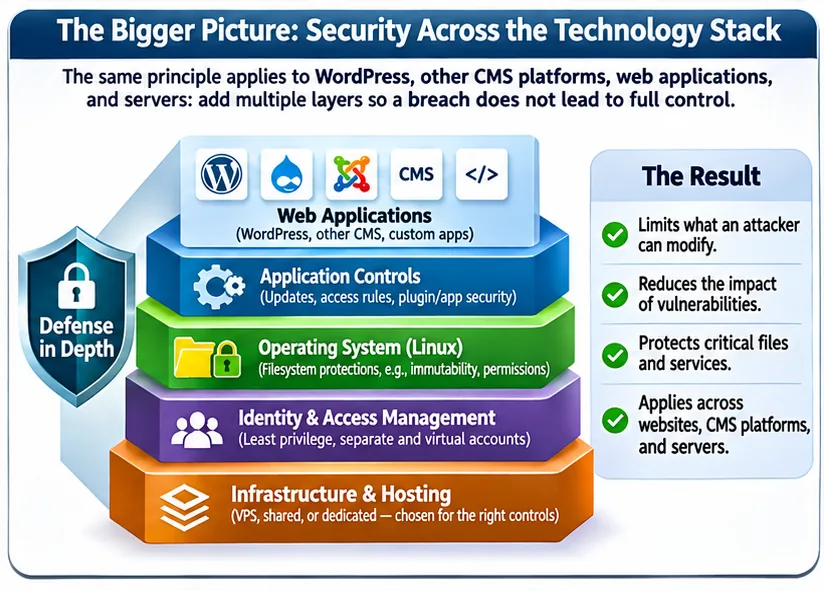
This brings me to what I consider to be one of the most important aspects of modern cybersecurity.
Organizations often rely heavily on hosting providers, software vendors, and managed services without fully understanding the underlying technologies or the security limitations of those environments.
Using managed services is not inherently a problem. In many cases, a well-managed service provides stronger security than an organization could achieve independently.
The problem arises when organizations assume that a provider's security controls address every risk relevant to their business.
Also, your service provider may not fully understand or know how you use technology for your business since they are offering a product or service.
Security professionals should understand the technologies their organizations depend on, including the operating system, application architecture, identity model, network boundaries, service privileges, and available security controls.
They should also understand where the service provider's responsibilities end and their organization's responsibilities begin.
Without that understanding, it becomes difficult to evaluate whether the existing technology stack provides sufficient protection.
For example, a business might choose shared hosting because it is inexpensive and easy to manage.
For a small informational website, that may be entirely appropriate.
However, traditional shared hosting generally does not give customers the operating-system privileges needed to apply Linux filesystem immutability through the chattr command or other controls requiring elevated privileges.
A VPS may provide greater control over filesystem permissions, application isolation, networking, monitoring, and operating-system security.
For an organization processing sensitive information, those additional capabilities may justify considering a different hosting architecture.
But a VPS is not automatically more secure.
It introduces additional administrative responsibilities, and an improperly managed VPS can be considerably less secure than a well-maintained shared hosting environment.
The decision should depend on the organization's risks, available expertise, and operational requirements.
Choosing a technology stack is therefore also a security decision, not merely a financial or operational one.
The question should not simply be, "Which hosting environment costs less?"
We should also ask, "Which environment gives us the controls necessary to protect what matters most?"
Understanding Your System Privileges Can Change How You Design Systems
The same thinking applies beyond websites.
Consider vulnerabilities that allow an attacker with limited operating-system access to escalate privileges.
Some vulnerabilities become significantly more dangerous when an attacker already has access to a native operating-system account.
Understanding this relationship can influence how we design authentication and access controls.
For example, traditional file-transfer protocol(FTP) services may provide users with individual operating-system accounts.
Depending on how those accounts are configured, compromising one may expose additional operating-system functionality.
An alternative is to use application-managed virtual accounts, such as those supported by CrushFTP Server which I used in the past hence my reference. There are other commercial products like it including opensource.
These accounts can allow users to access authorized file-transfer resources without requiring a separate native operating-system login for each person.
This reduces unnecessary operating-system identities and can help reduce a particular risk. This is just an example of how IT professionals could approach security from the ground up.
By using application-managed virtual accounts instead of native operating-system accounts, we can remove a potential pathway to local privilege escalation. Even if an attacker compromises a virtual account, that account does not inherently provide an operating-system login or interactive shell.
This separation is very important because a compromised file-transfer virtual account does not automatically provide an operating-system login from which to attempt local privilege escalation. Vulnerabilities in the file-transfer service itself must still be addressed separately.
Nevertheless, the architecture can reduce exposure by separating application-level access from direct operating-system access.
This is the wider approach that I am recommending.
When we understand how our systems work, we can make architectural decisions that reduce the consequences of vulnerabilities before those vulnerabilities are exploited.
Sometimes that means filesystem immutability.
Sometimes it means reducing privileges, isolating services, redesigning authentication, or selecting a different hosting environment.
The appropriate solution depends on the technology stack and the organization's risk profile.
Extending the Approach to Shared Hosting
My research and development efforts are not limited to WordPress installations hosted on VPS environments.
I am also researching an approach to provide similar protection against unauthorized file modifications in shared hosting environments.
This presents a different technical challenge.
Shared hosting customers generally do not have the privileged operating-system access required to apply Linux filesystem immutability directly or they may be using a filesystem that is not compatible with it.
Achieving similar protection therefore requires exploring alternative mechanisms that operate within the restrictions of those environments.
The objective is not to claim that an application-level mechanism can necessarily provide identical guarantees to Linux-native filesystem protection.
Instead, the research focuses on identifying practical ways to reduce unauthorized modifications while respecting the architectural limitations of shared hosting.
This is still in development. (I had hoped to have achieved this in 2026, however due to other reasons not related to the technological challenges, I have not been able to do this as yet, but I will be working to achieve this soon.)
It also reinforces why understanding the underlying technology stack matters.
For some organizations, a shared hosting solution with additional safeguards may provide an appropriate balance of security, cost, and operational simplicity.
For others, the risks may justify moving to a VPS or another environment where stronger operating-system controls can be implemented.
The goal is not to promote one hosting model over another. It is to help organizations make informed security decisions based on their actual needs.
Troubleshooting Should Reveal the Cause, Not Just Remove the Symptom
The WordPress investigation I did also reinforced another principle that has shaped my work throughout my career.
Fixing a symptom is not necessarily the same as resolving the underlying problem.
When the subdomain website returned HTTP 500 errors, removing one of the conflicting PHP declarations did restore access.
But that alone did not address the unauthorized accounts, malicious plugins, or other evidence of compromise. Initially this is what I did as a test to confirm the cause of the errors and at that time I did not yet conclude there was a compromise, so I continued after that confirmation since I understood that this did not answer the question as to why there were the conflicting PHP declarations in the first place.
So, I investigated the failure further, identified the suspicious activity, preserved the evidence, and determined the extent of the known compromise, and implemented corrective actions, which in this case also included installing the latest WordPress version.
The remediation included neutralizing unauthorized accounts, invalidating sessions, quarantining malicious files, verifying WordPress integrity, and checking for additional persistence.
For readers interested in the investigation process, NIST’s Guide to Integrating Forensic Techniques into Incident Response provides practical guidance on collecting and examining evidence during security investigations.
I am formalizing this structured approach into a troubleshooting methodology called TRACE.
TRACE stands for:
-
Triage: Identify the symptoms, impact, and initial evidence.
-
Reproduce: Confirm the observed problem or establish the conditions under which it occurs.
-
Audit: Investigate logs, configurations, files, permissions, and related components.
-
Confirm: Validate findings and distinguish confirmed causes from unresolved hypotheses before deciding corrective measures.
-
Execute and Evaluate: Apply the appropriate remediation and verify the results.
TRACE is intended to help persons better understand why a problem happened rather than simply applying commands or fixes without understanding their consequences.
It is a human-led methodology that can also be used alongside AI-assisted troubleshooting.
Coming Soon: Ask Miguel How on YouTube
I am preparing to officially launch my YouTube channel, Ask Miguel How, with the first troubleshooting demonstrations planned for the first quarter of 2027.
The channel will focus on practical troubleshooting involving Linux, WordPress, networking, virtualization, cybersecurity, and other technology challenges. I will also include guidelines for non-technical persons. For example, how to secure your Gmail account or your WiFi and others.
One of the planned demonstrations will recreate the WordPress security incidents described in this article using a controlled virtual lab.
I will demonstrate how the HTTP 500 error led to discovering a deeper security problem, how to investigate suspicious components, and how to verify that the remediation was a success.
I will also show how TRACE can guide the investigation step by step.
The objective is not simply to provide commands that fix problems, which is very easy to accomplish today especially with the help of AI. This however is similar to restarting a computer that seemed to fix a problem, without understanding the real cause or its solution.
So my aim is to help viewers understand their systems, investigate problems logically, and develop the confidence to make better technical decisions.
The channel is not yet officially launched, but you can visit https://askmiguel.how to find the subscription link and follow its progress.
Subscribers will be able to see the demonstrations as they are published.
Supporting the Next Stage of My Cybersecurity Work
My approach to cybersecurity is shaped by more than 20 years of experience working with systems, servers, networks, applications, infrastructure, and most of all understanding how users understand and use different systems. This is an important part that IT professionals can overlook when focusing only on technical details.
That experience has taught me that security is most effective when we understand how the different components of a system interact, how users use systems, and how an attacker might exploit the relationships between them.
I am applying that knowledge to develop practical security solutions, including Masada Hardening Pro, and to help organizations evaluate and strengthen their existing technology environments.
I am currently seeking opportunities in three areas.
-
Cybersecurity and infrastructure consulting: I can assist organizations with assessing their technology stacks, identifying potential attack paths, reviewing hosting and infrastructure decisions, and implementing appropriate security controls. This includes helping organizations understand whether their current environment provides the protections required for their particular risks.
-
Research and development sponsorship: I am seeking financial support to continue developing Masada Hardening Pro and researching additional security solutions, including approaches intended to provide comparable file-protection capabilities in shared hosting environments. Such support would help sustain the research, development, testing, and refinement required to turn these ideas into practical solutions.
-
Strategic partnerships and collaboration: I am interested in working with hosting providers, businesses, technology professionals, and other organizations that recognize the importance of infrastructure-aware security engineering. My broader objective is to build sustainable opportunities around this work while continuing to develop solutions that address real-world security challenges.
Masada Hardening Pro is one example of that approach, and the value I offer extends beyond one product.
It is the ability to understand complex technology environments, anticipate how vulnerabilities might be exploited, and design practical controls that reduce risk.
The Question We Should Be Asking
As AI continues to accelerate vulnerability discovery and exploitation, organizations may increasingly face situations where weaknesses are identified before a fix can be applied.
We must continue patching, monitoring, assessing vulnerabilities, and preventing unauthorized access.
But we should not depend exclusively on those measures.
We also need to understand our technology stacks well enough to anticipate how an attacker might move through them and what controls could limit that movement.
Sometimes that requires changing filesystem permissions.
Sometimes it requires isolating services, reducing operating-system privileges, redesigning authentication, or reconsidering the hosting environment itself.
Sometimes even changing your stack or type of hosting. For example, if the risks justify it, an organization might move from shared hosting to a VPS where designated administrators can use Masada Hardening Pro to manage Linux filesystem immutability without needing advanced Linux knowledge. Access requires explicit assignment by the administrator who initially installed the plugin, along with MFA; WordPress administrator status alone is insufficient.
There is no one solution for every system.
But there is a principle that applies across many environments.
We may not always be able to prevent a thief from breaking into our home. But we can design it so that gaining entry does not automatically provide access to everything inside.
That is the approach to cybersecurity I believe deserves greater attention today.
And it is the approach I am working to turn into practical solutions.
Interested in strengthening your organization's security architecture or supporting further cybersecurity research?
I welcome consulting opportunities, research sponsorship, and strategic partnerships focused on building more resilient technology environments.
Learn more and follow my upcoming troubleshooting demonstrations at https://askmiguel.how.
References
-
Microsoft - Prevent or reduce business damage from a breach.
-
New Zealand National Cyber Security Centre - Frontier AI: Managing the increasing risks from vulnerabilities.
-
WordPress - WordPress 7.0.2 Release.
-
Linux manual pages - chattr(1): Change file attributes on a Linux filesystem.
-
WordPress Developer Resources - Hardening WordPress.
-
NIST - SP 800-86: Guide to Integrating Forensic Techniques into Incident Response.